Trekboy

Well-known member
First Name
Mark
Joined
Sep 1, 2023
Threads
0
Messages
181
Reaction score
320
Location
Redding, CA USA
Vehicles
Tesla Model 3, Cybertruck
Country flag
I cleaned mine once. I went very slow and step by step so I wouldn't break anything. I did carefully unplug things. Pro tip: I use a 50/50 mix of distilled water and 90% isopropyl AND i use a totally lint-free microfiber made for glass. These are usually waffle types. If you use the run of the mill yellow ones from Costco, you'll have very hard to remove yellow lint bits.
Tesla Cybertruck How-to Clean Forward Camera View / Glare Shield (fix "camera visibility limited" issue) - DIY glass microfiber
Sponsored


JDin NFLA

Well-known member
First Name
Joel
Joined
Feb 22, 2025
Threads
1
Messages
78
Reaction score
106
Location
Jacksonville Beach
Vehicles
25 Beast previous 22 MYP
Country flag
Did you reset the das and calibrate the cameras as Tesla mentions in the service bulletin? I did and just drove 1,000 miles never a warning after unable to use in the sun when it was dirty.
 

Bridgeboy69

Well-known member
Joined
Oct 12, 2024
Threads
1
Messages
378
Reaction score
425
Location
California
Vehicles
2024 Foundation Cyberbeast & 2023 Model Y Performance
Occupation
Trying to Survive
Country flag
I cleaned under the Glare Shield today, mostly following the Tesla procedure, not too tough. The first step is to remove the rearview mirror, which most of you have done already lol. I previously bought a set of Torx bits, you need a T20.

Then it's just a matter of gently prying away the Beauty Cover from the 4 clips. I used my trim-removal tools from Amazon and didn't break anything.

IMG_0485.webp


I also opted to skip cable disconnection and let the parts dangle. That's not great for the cables, but unplugging and reconnecting has its own risks as well. The trick was to avoid banging into the dangly bits while cleaning. (UPDATE: When I replaced the Glare Shield after my 2nd cleaning attempt, I spent a good 30 minutes trying to separate the GPS antenna from the connector, and gave up when I was was sure it would break if I tried any harder.)

After the Beauty Cover, the Glare Shield is easy, with one unlocking tab on each side. Again I opted to leave the cable connected. (UPDATE: the Glare Shield plastic is very stiff and brittle, handle the tabs gently or they will break! Only $30 to replace.)

Then the fun begins. I tried IPA but that just smeared everything around. Next was quality glass cleaner and a Magic Eraser, followed by microfiber wipedown. I repeatedly exited to check the progress from outside, where the sun was clearly highlighting any inadequacies.

I cleaned the lenses with photographer's lens paper and lens cleaner. (There are three "lenses" but the one closest to the passenger is just a blank plastic insert.) I used a compressed-gas duster to clear the area of dust and residue.

After verifying it looked good in the Camera Preview, I buttoned it back up. The only tricky part was the Glare Shield, since it has little tabs at the top that must line up with the corresponding hooks on the camera housing. Be very careful with the tabs when reinstalling!

Hopefully I won't need to repeat this procedure too often, but I did notice the little PC-type cooling fan on the camera housing. The required airflow will result in the area under the shield being constantly exposed to contaminants.

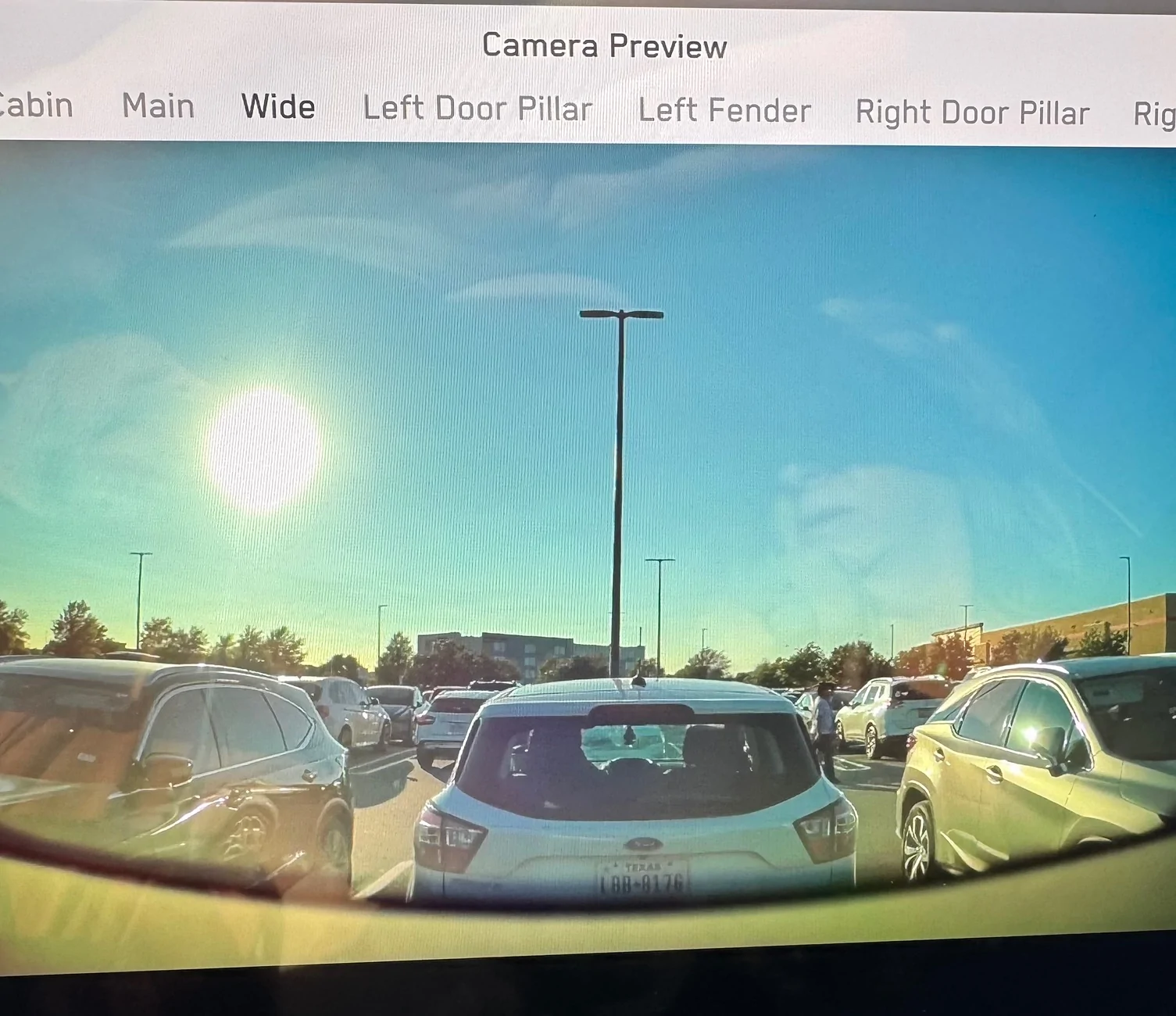
UPDATE: this the camera preview after cleaning, while pointing directly into the sun.

Tesla Cybertruck How-to Clean Forward Camera View / Glare Shield (fix "camera visibility limited" issue) - DIY {filename}


The glare visible on the image is due to the reflection off the screen, the image itself is perfect. I never get the "red hands of death" nor phantom wipes when the view is this clean.
I just made a post in another thread and then saw this one, and the issue is related. How well did your cover go back on?...I guess you're calling it a "beauty cover?" Well, mine is more an "Ugly Cover"...at least from the passenger side anyway....
🫤

https://www.cybertruckownersclub.com/forum/threads/what’s-broken-that-you-might-not-realize-example-beast-top-speed-of-114-bad-inverters.41956/post-30725880

Tesla Cybertruck How-to Clean Forward Camera View / Glare Shield (fix "camera visibility limited" issue) - DIY 1766171463319-z
 
OP
OP
CyberGus

CyberGus

Well-known member
First Name
Gus
Joined
May 22, 2021
Threads
89
Messages
9,632
Reaction score
31,620
Location
Austin, TX
Vehicles
1981 DeLorean, 2024 Cybertruck
Occupation
IT Specialist
Country flag
Did you reset the das and calibrate the cameras as Tesla mentions in the service bulletin? I did and just drove 1,000 miles never a warning after unable to use in the sun when it was dirty.
It shouldn't be necessary to reset the DAS nor recalibrate the cameras unless you specifically got the "cameras obscured" Alert, or a camera was disconnected. (And, you can't record the cleaning procedure without "Toolbox 3", oh well.)


OP
OP
CyberGus

CyberGus

Well-known member
First Name
Gus
Joined
May 22, 2021
Threads
89
Messages
9,632
Reaction score
31,620
Location
Austin, TX
Vehicles
1981 DeLorean, 2024 Cybertruck
Occupation
IT Specialist
Country flag
I just made a post in another thread and then saw this one, and the issue is related. How well did your cover go back on?...I guess you're calling it a "beauty cover?" Well, mine is more an "Ugly Cover"...at least from the passenger side anyway....
All 4 clips snapped back into place. If you can tug downward on that corner and it moves significantly, then likely a clip is broken (or maybe just not engaged).

The Beauty Cover should be flush to the windshield, but it's not a snug nor precision fit.
 

REM

Well-known member
Joined
Dec 9, 2023
Threads
13
Messages
3,268
Reaction score
5,904
Location
NC
Vehicles
2020 Model 3 Standard Range++ & Diet Cybertruck, Dual Motor
Occupation
Professional Retard
Country flag
I cleaned mine once. I went very slow and step by step so I wouldn't break anything. I did carefully unplug things. Pro tip: I use a 50/50 mix of distilled water and 90% isopropyl AND i use a totally lint-free microfiber made for glass. These are usually waffle types. If you use the run of the mill yellow ones from Costco, you'll have very hard to remove yellow lint bits.
Tesla Cybertruck How-to Clean Forward Camera View / Glare Shield (fix "camera visibility limited" issue) - DIY {filename}


This method really helped me clear my glass of off-gassing haze.
 

jareed85

Member
Joined
Mar 4, 2024
Threads
1
Messages
11
Reaction score
10
Location
socal
Vehicles
CT AWD, Model X
Country flag
i was able to record my at home cleaning by going into service mode and selecting the area from the cleaning instructions “toolbox 3” picture. the box will then appear and ket you reset the das and log the cleaning completed
 

JDin NFLA

Well-known member
First Name
Joel
Joined
Feb 22, 2025
Threads
1
Messages
78
Reaction score
106
Location
Jacksonville Beach
Vehicles
25 Beast previous 22 MYP
Country flag
It shouldn't be necessary to reset the DAS nor recalibrate the cameras unless you specifically got the "cameras obscured" Alert, or a camera was disconnected. (And, you can't record the cleaning procedure without "Toolbox 3", oh well.)
I did get the alert prior so needed to clear. Good point.


pae1andonly

Well-known member
First Name
Paul
Joined
Apr 29, 2025
Threads
11
Messages
243
Reaction score
232
Location
? ??
Vehicles
2024 RAM 2500
Occupation
Retired
Country flag
I had the local SC do the clean. Didn't notice for a week or so, but they failed to tighten the rear-view mirror. Which became apparant when I attempted to to re-install my radar detector to the rear view mirror post.
 
OP
OP
CyberGus

CyberGus

Well-known member
First Name
Gus
Joined
May 22, 2021
Threads
89
Messages
9,632
Reaction score
31,620
Location
Austin, TX
Vehicles
1981 DeLorean, 2024 Cybertruck
Occupation
IT Specialist
Country flag
this plastic pin that slots into a hole on the beauty cover, prevents the cover from just falling down like i see here in this thread.
My early-2024 truck doesn't seem to have any such pin, but maybe I broke it off the first time lol.

The EPC doesn't really show a pin either:

Tesla Cybertruck How-to Clean Forward Camera View / Glare Shield (fix "camera visibility limited" issue) - DIY Screenshot 2025-12-22 at 2.59.13 PM


But it shows show that the "FRONT OVERHEAD CONSOLE ASSEMBLY(4)" has both an older and a revised part number:

1806612-00-H
1806612-00-I

so maybe it was a running change?

A replacement Overhead Console from Tesla is $105. I'm sure this is one of the cheaper mistakes you've made in life :LOL:

Agreed that the arrows in the procedure are misleading, you should click the "Send Procedure Feedback" on that page and perhaps they will improve it. If it's any consolation, the Glare Shield tabs are often damaged, even when handled correctly and carefully.
 
Last edited:

bg002h

Well-known member
Joined
Jul 10, 2024
Threads
9
Messages
385
Reaction score
269
Location
Arizona
Vehicles
Cyberbeast
Occupation
Radiologist
Country flag
I took mine in to SC for courtesy cleaning after the software complained it was dirty. The SC had to replace the cover and remount GPS unit inside because they damaged the plastic while performing the cleaning. I don’t think Tesla plastic is meant to get hot or be exposed to direct sunlight…something makes their plastic get brittle after a year or so.
 

Art138

Well-known member
First Name
Art
Joined
May 25, 2023
Threads
14
Messages
1,110
Reaction score
1,039
Location
Weston,Florida
Vehicles
MYP,Ford GT & FS CYBERBEAST
Country flag
I took mine in to SC for courtesy cleaning after the software complained it was dirty. The SC had to replace the cover and remount GPS unit inside because they damaged the plastic while performing the cleaning. I don’t think Tesla plastic is meant to get hot or be exposed to direct sunlight…something makes their plastic get brittle after a year or so.
I ordered the beauty and the glare shield to have as spares for that reason. That area is exposed to intense heat - particularly here in S Florida.
Sponsored


Top