Back up power in this crazy freezing temp

iproduce

Active member
First Name
Steve
Joined
May 16, 2024
Threads
5
Messages
39
Reaction score
72
Location
Franklin, TN
Vehicles
Cybertruck, Model S, Model X
Occupation
Producer
Country flag
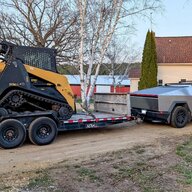
The power went out at our house and my cybertruck is plugged to the gateway 3v charged at 100% to serve as our back up power. But apparently from my research the blue snowflake on the cybertruck screen means the battery is too cold to power the house? I’ve discussed this with roadside tech support and tried anything and everything to warm up the battery to charge the house. Tech support said it will not work unless the battery is at 20 degrees and for some reason they can see the temp of my battery but I cannot. Super frustrating. They kept telling me to defrost the car to warm up the battery but within 10-20 min the defrosting used 15% of the battery defeating why I was charging it at 100%. I wish I knew that the battery needed to be warmed up in order to work in case of a power outage. Very frustrating. I literally drove in circles on my horse field trying to warm up the battery for at least 20 min and according to tech support they could see the battery temp went from 2 to 6 %. Does anyone have any good tips? I could not park it in the garage due to where my charger is. Our garage is a separate garage with a secondary power utility so if I installed the wall power there it wouldn’t back up the main house. But for tonight I parked it there hoping the battery will warm up by morning since it is insulated there.

Tesla Cybertruck Back up power in this crazy freezing temp IMG_1124


Tesla Cybertruck Back up power in this crazy freezing temp IMG_1127


Tesla Cybertruck Back up power in this crazy freezing temp IMG_1121


Tesla Cybertruck Back up power in this crazy freezing temp IMG_1122
Sponsored


JCERRN

Well-known member
First Name
J
Joined
May 3, 2021
Threads
30
Messages
1,065
Reaction score
1,215
Location
Around
Vehicles
Yeah
Country flag
The power went out at our house and my cybertruck is plugged to the gateway 3v charged at 100% to serve as our back up power. But apparently from my research the blue snowflake on the cybertruck screen means the battery is too cold to power the house? I’ve discussed this with roadside tech support and tried anything and everything to warm up the battery to charge the house. Tech support said it will not work unless the battery is at 20 degrees and for some reason they can see the temp of my battery but I cannot. Super frustrating. They kept telling me to defrost the car to warm up the battery but within 10-20 min the defrosting used 15% of the battery defeating why I was charging it at 100%. I wish I knew that the battery needed to be warmed up in order to work in case of a power outage. Very frustrating. I literally drove in circles on my horse field trying to warm up the battery for at least 20 min and according to tech support they could see the battery temp went from 2 to 6 %. Does anyone have any good tips? I could not park it in the garage due to where my charger is. Our garage is a separate garage with a secondary power utility so if I installed the wall power there it wouldn’t back up the main house. But for tonight I parked it there hoping the battery will warm up by morning since it is insulated there.

IMG_1124.webp


IMG_1127.webp


IMG_1121.webp


IMG_1122.webp

[/QUOTEgo
Defrosting warms the cabin, it wont eliminate the snowflake. set a supercharger as your destination but turn off cabin hvac. It will precondition the battery for supercharging, therefore warming the battery. This will use a whole lot of battery capacity though. You can cancel as soon as the snowflake goes away and it will stop preconditioning immediately
 

Tallgeese179

Well-known member
First Name
Nikola
Joined
Sep 11, 2025
Threads
2
Messages
91
Reaction score
190
Location
Pittsburgh, PA
Vehicles
2025 CT AWD, 21 BMW X7, 15 370Z Nismo
Country flag
Sorry to hear about the trouble, but I'm also grateful to be aware of possible pitfalls of relying on the truck for backup power in the winter.

In my case, I could settle for just running my furnace from a 5-15 exterion cord plugged into the bed outlets. Guess I'll have to do a dry run to check and make sure everything works. Definitely won't be getting rid of my trifuel backup generator anytime soon. At least not until I'd have a solid set of LFP home backup batteries in the basement.
 

Pulaski

Well-known member
Joined
Nov 17, 2023
Threads
3
Messages
267
Reaction score
454
Location
Minnesota
Vehicles
Ram 5500(2021), F-450(2014), Chevy Colorado(2022), FS CB
Country flag
Defrosting warms the cabin, it wont eliminate the snowflake. set a supercharger as your destination but turn off cabin hvac. It will precondition the battery for supercharging, therefore warming the battery. This will use a whole lot of battery capacity though. You can cancel as soon as the snowflake goes away and it will stop preconditioning immediately
Yep spot on.
 

J.Graham

Well-known member
Joined
Jan 1, 2021
Threads
7
Messages
200
Reaction score
457
Location
BC
Vehicles
FS AWD & Model Y LR & 993
Country flag
Try going into "set schedules" and set a departure time for a half an hour ahead, that should get the battery preconditioning and warm it up


Jager

Well-known member
First Name
Jeff
Joined
May 25, 2020
Threads
24
Messages
304
Reaction score
985
Location
Virginia
Vehicles
2024 Cybertruck AWD, 2022 Model 3 LR AWD
Country flag
Turning on Climate will heat the battery, if it is cold enough.

Navigating to a Supercharger will, as well, but that of course requires you to be in the vehicle.

There are some other challenges with using the Cybertruck as a backup power source in extreme conditions. I'll post something once I have that sorted.
 

That Beast Mode

Well-known member
First Name
Phil
Joined
Mar 15, 2025
Threads
13
Messages
1,189
Reaction score
1,565
Location
New Jersey
Vehicles
Cybertruck
Country flag
Go to an actual supercharger if possible, navigating to it will condition the battery and you can top off in your time of need..
 

mongo

Well-known member
Joined
May 27, 2024
Threads
3
Messages
4,046
Reaction score
4,803
Location
SE Michigan
Vehicles
Cyberbeast
Country flag
The power went out at our house and my cybertruck is plugged to the gateway 3v charged at 100% to serve as our back up power. But apparently from my research the blue snowflake on the cybertruck screen means the battery is too cold to power the house? I’ve discussed this with roadside tech support and tried anything and everything to warm up the battery to charge the house. Tech support said it will not work unless the battery is at 20 degrees and for some reason they can see the temp of my battery but I cannot. Super frustrating. They kept telling me to defrost the car to warm up the battery but within 10-20 min the defrosting used 15% of the battery defeating why I was charging it at 100%. I wish I knew that the battery needed to be warmed up in order to work in case of a power outage. Very frustrating. I literally drove in circles on my horse field trying to warm up the battery for at least 20 min and according to tech support they could see the battery temp went from 2 to 6 %. Does anyone have any good tips? I could not park it in the garage due to where my charger is. Our garage is a separate garage with a secondary power utility so if I installed the wall power there it wouldn’t back up the main house. But for tonight I parked it there hoping the battery will warm up by morning since it is insulated there.

IMG_1124.webp


IMG_1127.webp


IMG_1121.webp


IMG_1122.webp
Do you have solar also?
 

mongo

Well-known member
Joined
May 27, 2024
Threads
3
Messages
4,046
Reaction score
4,803
Location
SE Michigan
Vehicles
Cyberbeast
Country flag
Turning on Climate will heat the battery, if it is cold enough.

Navigating to a Supercharger will, as well, but that of course requires you to be in the vehicle.

There are some other challenges with using the Cybertruck as a backup power source in extreme conditions. I'll post something once I have that sorted.
Sure does. Note that max defrost will prioritize cabin heat over pack charging.
I think a take away is to only charge to 98ish so that, if needed, one can start a charge cycle which only heats the pack, not the cabin.


JCERRN

Well-known member
First Name
J
Joined
May 3, 2021
Threads
30
Messages
1,065
Reaction score
1,215
Location
Around
Vehicles
Yeah
Country flag
Try going into "set schedules" and set a departure time for a half an hour ahead, that should get the battery preconditioning and warm it up
Careful- only stays active for 15 minutes by default. I think this can be changed in settings
 
OP
OP
iproduce

iproduce

Active member
First Name
Steve
Joined
May 16, 2024
Threads
5
Messages
39
Reaction score
72
Location
Franklin, TN
Vehicles
Cybertruck, Model S, Model X
Occupation
Producer
Country flag
Some screen grabs from support. Sort of defeats the purpose of this being my back up generator. If I knew this I would’ve been driving around the block and keeping it prepped.
Do you have solar also?
No, we do not have solar yet...

Tesla Cybertruck Back up power in this crazy freezing temp IMG_1130


Tesla Cybertruck Back up power in this crazy freezing temp IMG_1128


Tesla Cybertruck Back up power in this crazy freezing temp IMG_1129
 

mongo

Well-known member
Joined
May 27, 2024
Threads
3
Messages
4,046
Reaction score
4,803
Location
SE Michigan
Vehicles
Cyberbeast
Country flag
Some screen grabs from support. Sort of defeats the purpose of this being my back up generator. If I knew this I would’ve been driving around the block and keeping it prepped.

No, we do not have solar yet...

IMG_1130.webp


IMG_1128.webp


IMG_1129.webp
I wonder if it assumes there might be solar anyway and won't engage if it can't absorb excess. So the same sort of limits as regen.

An energy efficient way to warm the battery if it is already at 100% is to sit in the truck with the climate off. Or run climate from app with a low temperature.

You can check the pack temperature by entering service mode. Lots of fun screens there.
Menu->Software-> long press Cybertruck, password is service.
Tesla Cybertruck Back up power in this crazy freezing temp AISelect_20260126_163934_Gallery
Tesla Cybertruck Back up power in this crazy freezing temp AISelect_20260126_164006_Gallery
 
OP
OP
iproduce

iproduce

Active member
First Name
Steve
Joined
May 16, 2024
Threads
5
Messages
39
Reaction score
72
Location
Franklin, TN
Vehicles
Cybertruck, Model S, Model X
Occupation
Producer
Country flag
I wonder if it assumes there might be solar anyway and won't engage if it can't absorb excess. So the same sort of limits as regen.

An energy efficient way to warm the battery if it is already at 100% is to sit in the truck with the climate off. Or run climate from app with a low temperature.

You can check the pack temperature by entering service mode. Lots of fun screens there.
Menu->Software-> long press Cybertruck, password is service.
AISelect_20260126_163934_Gallery.webp
AISelect_20260126_164006_Gallery.webp
No way! Ok, this is good to know. Thanks!
 

mongo

Well-known member
Joined
May 27, 2024
Threads
3
Messages
4,046
Reaction score
4,803
Location
SE Michigan
Vehicles
Cyberbeast
Country flag
No way! Ok, this is good to know. Thanks!
Another fun trick is if you put the app or UI into miles of range mode (tap the SOC %), the mi/hour number is actual pack charging versus kWh which is gross power into the truck . However, it won't read negative, even if the truck is pulling from the pack to heat things.
Sponsored


Top